This is the filmcraft optimization story in one 87 second video, centered on export. filmcraft is an open source video editor written in Rust that also runs in the browser, and our fork of it runs live at grepawk.com/filmcraft. The video shows the editor, then walks through the measured export results, each with its source.
The editor footage is the live web build, recorded in headless Chrome and sped up. The cards are drawn only from the numbers below.
filmcraft optimization results: export
The fork's export can use the browser's hardware H.264 encoder through WebCodecs, and it streams the output to disk instead of holding it all in memory. Before that, export used the built-in software encoder and a CPU compositor, with the output buffered in WebAssembly memory. The numbers come from the fork's web export notes, measured at commit 7a02034c (before) and bd13e6c8 (after).
How it was measured:
- Machine: Apple M4 Pro (14 cores, 24 GB), Chrome 155.0.8059.40, with hardware video encode and WebGPU.
- Build: release, with
wasm-opt, threaded. - Each run: a fresh tab, OPFS cleared, the timeline scrubbed every 500 ms during the export, so UI frame times are measured under load.
- Output: H.264 at a pinned bitrate, 12 Mb/s at 1080p, variable rate.
- Statistic: median of 3 measured runs after one discarded warmup. The longer project below is 2 measured runs.
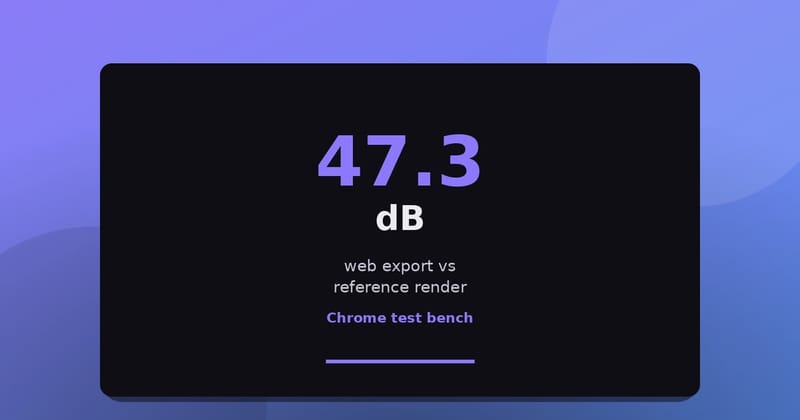
- Checks: every output was validated with ffprobe, A/V sync and PSNR and SSIM against a reference render.
A 6 second 1080p clip
| Software encoder (before) | Hardware encoder (after) | |
|---|---|---|
| Export time | 23.6 s | 7.1 s (3.3 times faster) |
| Frames per second | 7.63 | 25.19 |
| Share of real time | 0.25 | 0.84 |
| Timeline 95th percentile frame time during export | 309 ms | 42 ms |
| Long animation frame blocking time | 15 s | 0 s |
| Encode time per 1080p frame | 99 ms | 9 ms |
| Peak WebAssembly memory | 619 MiB | 533 MiB |
| Y-PSNR against the reference | 47.48 dB | 48.09 dB |
A longer edited project
This project is 12 seconds of 1080p30 with 2 video tracks, 3 cuts, a cross-dissolve, a basic Lumetri color effect, a title, dialogue and music with fades.
| Before | After | |
|---|---|---|
| Export time | 168.2 s | 133.8 s (1.26 times faster) |
| Peak WebAssembly memory | 1400 MiB | 981 MiB (about 30% less) |
| Timeline 95th percentile frame time during export | 667 ms | 658 ms |
| Time spent compositing on the CPU | 130.1 s | 128.4 s |
The hardware encoder removes the encode cost, but this project is limited by compositing, which is now 96% of its export time. That is why the gain is 1.26 times instead of 3.3 times. The software encoder path is still available and its output is byte-identical to before.
Frame conversion with WebAssembly SIMD
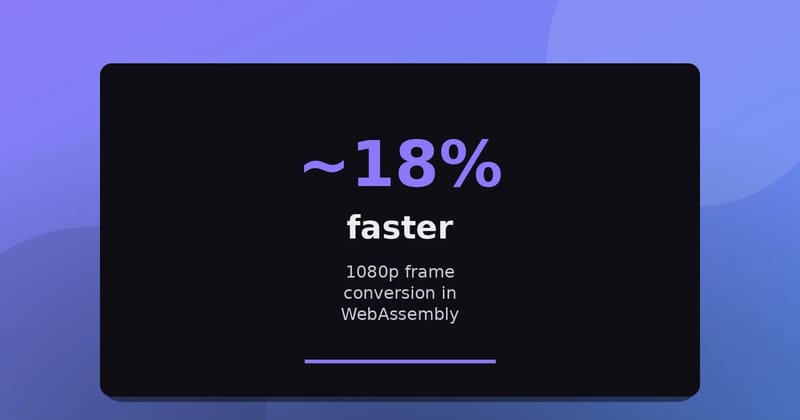
Every decoded frame is YUV and has to become RGBA before the screen can draw it. The fork builds the web version with WebAssembly SIMD (simd128) and adds a conversion kernel that handles 4 pixels per step. A checksum of every output frame matches across builds, so the pixels are identical.
| 1080p 4:2:0 frame to RGBA, median | Upstream | Fork |
|---|---|---|
| x86 virtual machine, 8 vCPU | 72.3 ms | 59.2 ms (about 18% faster) |
| Apple M4 Pro, Node 22 | 13.71 ms | 12.25 ms (about 11% faster) |
On the M4 Pro, turning on the SIMD flag alone changed nothing for upstream's code (13.71 ms against 13.77 ms), so the gain comes from the new kernel. See the earlier benchmark post for the method. In the browser's software decoder, a 540p clip took 3.9 ms per sample against 4.9 ms for upstream, on the x86 machine; more in what the fork gains in WebAssembly.
A faster software encoder
The built-in software encoder stays as the fallback. Its hot loops now use portable 128-bit SIMD from the wide crate, each bit-identical to the scalar code it replaces. For 1080p frames with the export's settings, the whole encoder went from 79.8 to 45.7 ms per frame natively on the M4 Pro (1.75 times), and from 109 to 117 ms down to 58 to 61 ms in WebAssembly under Node 22 (1.9 times). The output bytes are unchanged.
What is not covered
- GPU compositing for export is in progress. There is no published benchmark for it, so this post makes no claim about it.
- The export numbers come from one Apple M4 Pro. The software encoder numbers were measured under Node and natively, not inside Chrome.
- The threaded build does not speed up export today: the longer project took 168.2 s threaded and 168.8 s single-threaded before the change.
- The live site was redeployed on October 16 from the fork's main branch (
2ffd57e), so it includes the changes above. In our recording, the Export panel has the hardware encoder option checked by default. I did not time exports on the live site itself. - Bundle size, startup time and 120 Hz displays were not tested.
The raw numbers are in the fork's notes: web export, frame conversion and the software encoder. For more on video in the browser, see FinalCap.
Video transcript
filmcraft is an open source video editor in Rust that runs in the browser. This video is about how much faster our fork exports video. This is the fork's web build, live at grepawk.com/filmcraft. Cut a clip, add effects and a title, then press Export.
We timed export in Chrome 155 on an Apple M4 Pro. Each number is a median of three runs, with the timeline scrubbed during the export. Before the changes, a six second 1080p clip took 23.6 seconds to export, 17.9 of them in the software encoder. A longer edited project took 168 seconds.
With the browser's hardware H.264 encoder, the same clip exports in 7.1 seconds, 3.3 times faster. The timeline's 95th percentile frame time during export drops from 309 to 42 milliseconds. The longer project goes from 168 to 134 seconds, 1.26 times faster, and peak memory falls from 1,400 to 981 megabytes. It is now 96 percent CPU compositing.
Outside export, WebAssembly SIMD cuts 1080p frame conversion from 72 to 59 milliseconds on x86, and from 13.7 to 12.25 on an Apple M4 Pro. GPU compositing is in progress, with no published benchmark yet. Try the editor live at grepawk.com/filmcraft.